

In 2026, SQL development tools are crucial as developers and DBAs juggle larger datasets, faster deployments, and strict governance. These tools determine how you handle complex queries and ensure stable releases. But with so many options, how do you cut through the noise and find the right fit?
In this guide, we’ve done that work for you. We highlight the top SQL development tools for 2026, whether you need a solid baseline, an integrated toolkit, or a DevOps solution. Read on to find what keeps you in control.
Why SQL Server development tools matter in 2026
SQL Server development tools matter because database work now sits directly in the delivery path. It’s no longer just about writing correct queries. Teams are expected to ship schema changes faster, keep performance stable under real load, and maintain clear control over data access, often across a mix of on-prem, cloud, and hybrid environments.
In practice, native tools alone struggle to meet these expectations at scale. When teams rely only on the baseline, a few pressure points consistently surface:
- Security and governance are harder to keep consistent. In Redgate’s 2025 State of the Database Landscape, 38% of teams say data security and access control are among their top challenges when managing multiple platforms, up 12% year over year.
- Cloud introduces cost and performance trade-offs. About 63% of teams report cloud cost management issues, while 40% struggle with performance consistency and 37% with ongoing resource optimization. report cloud cost management issues, while 40% struggle with performance consistency and 37% with ongoing resource optimization.
- Release frequency raises the cost of mistakes. As schema changes become continuous, teams need changes to be reviewable, traceable, and reversible. Without the right tooling, release risk becomes a daily concern.
This is exactly why specialized SQL Server development tools have become standard. While SSMS is still essential, these tools fill the gaps: they provide robust schema comparison, repeatable deployments, safer data sync, and consistent standards: helping teams reduce risk and stay on track.
Why trust these SQL Server tool reviews
These reviews focus on how SQL Server tools perform in real work, not how they’re positioned in marketing. The aim is simple: identify tools that genuinely reduce risk and save time in everyday developer and DBA workflows.
Each tool is assessed in the following four practical areas.
| What we look at | How we evaluate it | Why it matters |
| Hands-on workflow fit | How comfortable the tool is when writing and debugging complex T-SQL (multi-join queries, window functions, and CTE-heavy logic) especially in large schemas. | Complex queries are where problems usually hide. Better workflow support means faster fixes and fewer surprises later. |
| Change control and safety | Whether the tool makes it easy to compare schemas, deploy changes consistently, and roll back safely when needed. | Most production issues come from uncontrolled changes. Good tooling keeps releases predictable. |
| Performance insight | How clearly the tool shows execution plans, highlights bottlenecks, and helps explain sudden slowdowns. | When performance drops, teams need answers quickly—not guesswork. |
| Automation and longevity | Support for scripting, pipelines, and enforcing team standards over time. | Manual processes don’t scale. Automation keeps teams aligned as systems grow. |
And why does this rigor matter now? In the 2025 Stack Overflow Developer Survey, 58.6% of developers reported regular use of SQL. At that scale, tooling choices impact onboarding speed, code consistency, incident rates, and delivery throughput. That’s why we apply a hands-on, real-world lens: so you can trust these tools in practice, not just on paper. you can trust these tools in practice, not just on paper.
Now let’s explore the trendiest SQL development tools in 2026.
List of the best SQL Server development tools
The following lineup is curated to cover the full lifecycle: query development, schema control, performance diagnostics, and automation for teams.
You’ll see four “stackable” choices below. One is an integrated SQL Server toolkit (best if you want one ecosystem). One is Microsoft’s native baseline (still essential, and free). Two are strong additions when you need elite refactoring + deployment automation, or when you’re building database DevOps pipelines with code-quality enforcement.
1. dbForge SQL Tools
Company: Devart
Rating: 4.4/5 (G2)
Devart’s dbForge SQL Tools is a professional solution built to cover SQL Server work end-to-end inside one ecosystem. It’s designed for developers and DBAs who spend time writing complex queries, comparing schemas and data across environments, and deploying changes without turning every release into a manual checklist.
A practical “2026” advantage is the bundle approach: instead of stitching together separate utilities, you get a coordinated set of tools for query productivity and controlled change. Recent versions also introduce cutting-edge AI-assisted features that help with query writing and analysis, complementing, not replacing, hands-on SQL work. Devart positions it as a SQL Server development bundle with a free 30-day trial.
It’s a strong fit when schema sync, data sync, scripted releases, and performance investigation are part of everyday work, not one-off tasks.
Alt text: SQL Server data comparison showing table differences between two databases.
Features
- SQL coding assistance and query tools for productivity.
- Built-in schema and data comparison (with a 30-day trial on data compare).
- Query performance analysis and diagnostics.
- A bundled suite that supports DevOps from development to deployment.
Pros
- Integrated toolset (fewer context switches for query > compare > deploy workflows).
- Strong fit for teams that need both developer productivity and DBA-grade controls.
Cons
- Paid bundle (best value shows up when you actually use the “full lifecycle” parts).
- Some teams may still standardize on SSMS + single-purpose add-ins.
Pricing
- Standard – starting around $429.95 per user/year.
- Professional – around $649.95 per user/year.
- Enterprise – around $699.95 per user/year.
A 30-day free trial is available, allowing evaluation of features before purchase.
▶︎ Explore official page
2. Microsoft SQL Server Development Tools (SSMS + SSDT)
Company: Microsoft
Rating: N/A (native tooling)
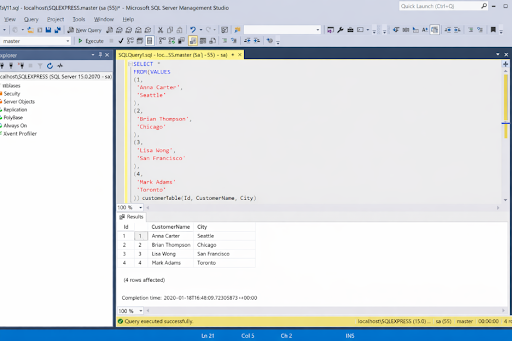
Microsoft SQL Server development tools are the baseline for most teams. They’re widely used, free to start with, and tightly integrated with SQL Server. Even teams that rely on third-party tools typically keep Microsoft’s tooling at the core of their workflow.
At the center is SQL Server Management Studio for administration and interactive SQL work. SSMS brings capabilities like built-in query tuning via execution plans, built-in performance tools, and newer features introduced in SSMS 22, such as preview AI assistance.
Microsoft’s core stack pairs SSMS with SQL Server Data Tools (SSDT) for database projects, schema-as-code development, deployment packaging through DACPACs, and tighter DevOps alignment via Visual Studio. SSDT is installed through Visual Studio workloads and is the standard approach for project-based SQL Server development.
Microsoft continues to update SSMS, but advanced schema comparison, automation, and deployment workflows often require add-ons.
Alt text: SQL Server Management Studio interface with Object Explorer, query editor running a SELECT statement, and results grid showing sample data.
Pros
- Free, standard, and widely supported across organizations.
- Strong compatibility with SQL Server features and admin surfaces.
- SSDT enables schema-as-code workflows via Visual Studio.
Cons
- Advanced compare/sync, refactoring depth, and team automation often require add-ons.
- Productivity features vary depending on workflow (interactive vs project-based).
Features
- Query editor, execution plans, built-in tuning tools, and BI admin surfaces in SSMS.
- SSDT installation via Visual Studio workloads; supports SQL database projects.
- Ongoing SSMS release cadence and feature evolution (release notes / channels).
Pricing
- Free: SSMS and SSDT are provided at no cost by Microsoft and remain the most widely used free SQL Server development tools across organizations.
3. Redgate SQL Toolbelt Essentials
Company: Redgate
Rating: 4.7/5 (G2)
Redgate’s SQL Toolbelt Essentials is built for teams that want best-in-class SQL Server coding assistance plus safe database change workflows. If your team already lives in SSMS, this bundle is popular because it enhances SSMS rather than forcing a new “home base.”
A key strength is the combination of developer speed tools (such as SQL Prompt for autocomplete and refactoring, and indexing insights surfaced directly in SSMS) and release safety tools like SQL Compare for controlled schema changes.
Additionally, Redgate offers 14-day trials for core tools including SQL Prompt and SQL Compare, making evaluation straightforward. Pricing for the Toolbelt subscription is published, with per-user annual tiers based on team size.
Alt text: SSMS 22 interface enhanced with Redgate tooling, showing index analysis recommendations inside the query editors.
Features
- SQL Prompt for autocomplete, formatting, refactoring, query history, and SSMS/Visual Studio integration.
- SQL Compare for schema comparison and deployment acceleration (with a free trial).
Pros
- Strong SSMS-first experience that enhances existing workflows.
- Clear separation between developer productivity (autocomplete, formatting, refactoring) and deployment safety (compare, sync, change management).
- Clear trial options for evaluating key tools before purchase.
- Transparent, published subscription pricing.
Cons
- Bundled licensing can be expensive if you only need one narrow capability.
- Toolchain breadth means you need basic internal standards to get full value.
Pricing
Redgate offers SQL Toolbelt Essentials as an annual, per-user subscription with tiered pricing:
- 1–4 users: ~$1,356 per user/year
- 5–9 users: ~$1,287 per user/year
- 10–19 users: ~$1,221 per user/year
- 20+ users: custom pricing (quote required)
A 14-day free trial is available for key tools such as SQL Prompt and SQL Compare.
Note: Pricing may vary by region, reseller, or volume discounts. The Toolbelt subscription bundles multiple tools, so its value is highest for teams that actively use both development and deployment features.
4. ApexSQL DevOps Toolkit
Company: Quest Software
Rating: 4.4/5 (G2)
ApexSQL DevOps Toolkit is built for teams that treat database changes as part of a CI/CD pipeline, not as manual release steps. Rather than acting as a single IDE replacement, it’s a module-based toolkit designed to automate database builds, enforce standards, and run unattended as part of delivery workflows.
The toolkit is explicitly positioned for database DevOps. Quest frames ApexSQL as a way to orchestrate SQL Server changes inside CI/CD pipelines, with support for automated builds, unit testing, and code reviews. A key differentiator is its focus on governance at scale: the toolkit includes rule-based code quality enforcement, a library of 100+ prewritten rules, and full CLI support for unattended execution. This makes it a strong fit for teams operating in regulated environments or with strict change controls.
Alt text: ApexSQL DevOps Toolkit interface is showing database schema selection, object filtering, and scripting options for automated SQL Server deployment.
Features
- CI/CD orchestration for SQL Server, including automated builds, testing, and code reviews.
- Unattended CLI processing with integration into pipelines and automation tools.
- Code quality enforcement using 100+ prewritten rules, with support for custom rules in C# or VB.NET.
- Integration with tools such as SQL Server Management Studio and Visual Studio.
Pros
- Strong CI/CD orientation, including CLI and automation framing.
- Code quality rules and reporting for governance-heavy teams.
Cons
- Quote-based pricing (harder to estimate without sales engagement).
- Best value shows up when you already have a pipeline and standards process.
Pricing
ApexSQL DevOps Toolkit uses quote-based pricing (“Request Pricing”), depending on modules and usage. A free trial is also available.
SQL Server Development tools comparison table (2026)
The following table summarizes the best SQL development tools 2026 has to offer. The goal is not to crown a single winner, but to show where each tool fits best: whether you’re using them as SQL Server front end development tools for query work, or as back-end automation and deployment platforms.
Legend
- ✓ = Strong, built-in support
- ◐ = Partial support or requires configuration/add-ons
| Tool | Best for | Query development | Schema tools | Performance analysis | Automation | Free trial |
| dbForge SQL Tools | Developers & DBAs | ✓ | ✓ | ✓ | ✓ | ✓ |
| SSMS + SSDT | Microsoft-native baseline | ✓ | ✓ | ✓ | ◐ | Free |
| Redgate SQL Toolbelt Essentials | SSMS enhancement + safe deployments | ✓ | ✓ | ◐ | ✓ | ✓ |
| ApexSQL DevOps Toolkit | CI/CD + code policy enforcement | ◐ | ✓ | ◐ | ✓ | ✓ |
Key takeaways
- SSMS and SSDT are necessary, but rarely sufficient on their own.
- dbForge SQL Tools suits teams that want one integrated workflow.
- Redgate suits teams that want to stay inside SSMS.
- ApexSQL suits teams running database changes through CI/CD.
- Faster releases demand stricter tooling.
The best SQL development tools 2026 comparison we covered sets the landscape. Next, let’s translate those differences into practical guidance for choosing the right tool.
How to choose SQL Server development tools
The right SQL Server development tool is the one that reduces risk in your hardest workflows, not the one with the longest feature list. Start by matching tools to the kind of SQL pain you actually have: complex query iteration, schema drift, performance regressions, or release automation. Here is what to consider:
- Complex query development: If your work involves deep joins, window functions, or CTE-heavy SQL, productivity tooling matters quickly. This is where the best SQL tools for complex query development stand out—by improving readability, navigation, and refactoring safety as queries grow. SSMS covers the basics, but richer formatting and refactoring reduce errors as queries grow.
- Schema comparison and rollback safety: When deploying across environments, schema comparison is a must, or else drift will catch up. You need tools that align schemas and ensure safe changes. Integrated sets, like using dbForge SQL Tools for both dev and release, keep everything consistent.
- Diagnosing performance problems: Performance issues usually appear late and under load. Choose tools that make execution plans easy to capture and compare, and that help pinpoint indexing, statistics, or query-shape issues quickly.
- Automating team workflows: If more than one person touches the database, go for tools that support automation. CLI access, repeatable scripts, and CI/CD integration reduce manual fixes and make releases predictable instead of heroic.
- Balancing free tools and productivity: Use free tools for simple setups, but reassess as releases speed up. Once manual steps and late errors become routine, repeatability and control usually deliver more value than a lower license cost.
Choosing the right SQL Server development stack
The right SQL database development tools depend on how complex your work is, how many people touch the database, and how often you ship changes. A solo developer can rely on Microsoft’s native tools. Teams shipping frequently usually need more support around comparison and automation.
A practical way to assemble the stack:
- Start with the Microsoft baseline. SQL Server Management Studio and SQL Server Data Tools cover core administration, interactive SQL work, and project-based development. Almost every team starts here.
- Add an integrated toolkit for repeat workflows. If work regularly moves from query to comparison to deployment, a single ecosystem reduces friction. Integrated toolsets like dbForge SQL Tools often fit at this stage.
- Enhance SSMS for higher productivity. If your team stays inside SSMS but needs stronger coding assistance and safer deployments, SSMS-first bundles such as Redgate SQL Toolbelt are a common addition.
- Go DevOps-first when automation is central. When database changes must run through CI/CD with policy enforcement and unattended execution, DevOps-focused toolkits like ApexSQL DevOps Toolkit belong at the core of the stack.
Over to you
Choosing the most effective SQL development tools in 2026 is less about features and more about fit. Developers need speed in complex query work, while DBAs need predictable, controlled changes. The best setups support both without adding friction.
Most teams reach that balance by combining tools. They start with Microsoft’s baseline, then add integrated toolsets, such as dbForge SQL Tools, once query development, schema comparison, and deployment begin to overlap. The right choice is the one that reduces risk and keeps releases reliable as complexity grows.